Screens
The dashboard has five views. You switch with the tabs at the top, and the # in the URL decides
which view is shown (#crawls, #start, #archives, #scripts; in the scripts view it also names
what you are reading). The contents tab only appears once you
enter it with 開く (open) on an archive row. The dashboard itself is in Japanese; the tab names are
クロール, 新しいクロール, アーカイブ, スクリプト and 中身.
The pictures on this page are taken against the stand-in ledger (the sandbox). Its scripts are copies from capture-scripts, the same ones a real ledger lists; only autoscroll v2 is the stand-in’s own version, there to show version chips.

| View | What it lists |
|---|---|
| Crawls | one row per crawl: state, pages captured, pages discovered, number of WACZ files (the archive format that packs captured pages into one ZIP), time taken, link to the run |
| New crawl | the form that starts a crawl: seed URLs, registered scripts, depth, the values of the variables the ticked scripts declare, and a script of your own in a box as tall as the window; a registered script can be read in a tab of the right column |
| Archives | the WACZ files you can see; from a row, validate, open the contents, or open in replay (which plays a WACZ back in the browser) |
| Scripts | the scripts that run inside the captured page and the types they are written against, to read line by line, older versions too; says so in red when the ledger has none |
| Contents | inside one WACZ; see Inspecting a WACZ |
The top of the screen says who you are looking as, and that it is a development identity. The footer shows how many rows are listed and how often the lists are fetched again.
The lists are one page of the ledger
Section titled “The lists are one page of the ledger”The crawls and archives views list only the first page the ledger returns (newest first). The dashboard does not fetch further pages. For archives, the ledger returns only the ones in that page that your identity may view, so there can be fewer rows than a page holds. The counts in the footer are the rows on screen, not everything the ledger has.
Crawls
Section titled “Crawls”Each row is one crawl. It shows the state, the first 8 characters of the id, who started it and for which organization, the first seed URL, pages captured, pages discovered, the number of WACZ files and the time taken. “run ↗” at the right end opens the Windmill run in a new tab.
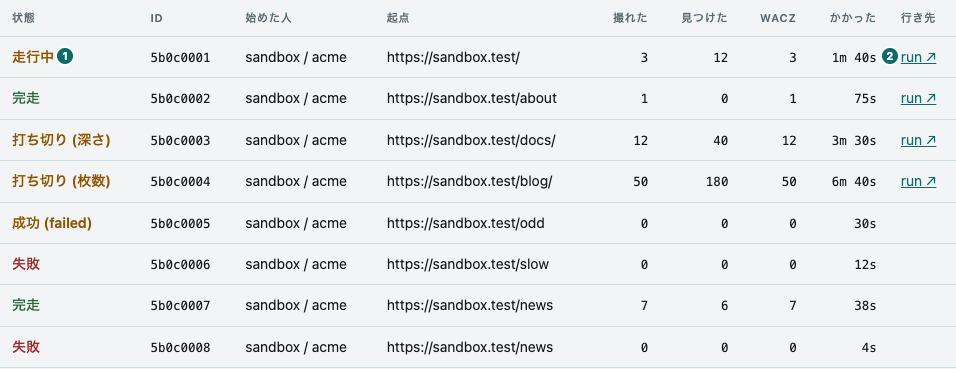
① state
② the link to the run
- Pages captured and pages discovered are separate columns. Pages discovered
(
pagesDiscovered) counts what was found by following links, so a crawl of depth 0 ends up as “captured 1, discovered 0”. Shown as1 / 0in one cell, the numerator looks bigger than the denominator, and people trip over it. - For a running crawl, the time taken is “so far”. A missing finish time means “not finished yet”, not “no time”.
- run ↗ is the run of the last level that was handed over. The link is built from the id of
lastJobthat the ledger returns, plus the Windmill origin and workspace the server hands out through/healthz. Rows where the ledger has nolastJobget no link.
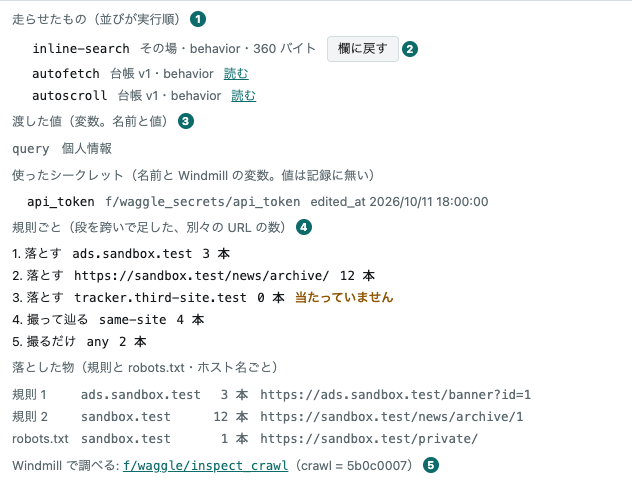
① what ran (in run order)
② 欄に戻す (back to the form)
③ 渡した値 (the values passed: variables) and 使ったシークレット (the secrets used)
④ the count per rule
⑤ Windmill で調べる (inspect in Windmill), the link to inspect_crawl
- Click a row to see why it failed, what ran in the page, which values it was given, and the
URLs that could not be fetched. Only then does the dashboard fetch
/api/crawls/:id. The ledger’serrorcomes first, in its own words: a crawl that failed at the compile step captured nothing, so its list of failed pages is empty and would otherwise read like a success. Next is what ran, in the order it ran: registered scripts with their version and a 読む (read) link to the scripts view at the version the crawl ran, and scripts written in the form marked その場 (written on the spot) with their size in bytes, each with a 欄に戻す (back to the form) button that takes you to the new crawl view. A site script carries its sites, as a chip such aslaws.e-gov.go.jp 用. Then come the values: the variables the crawl was started with (the ledger’svariables, name and value) and the secrets it used (secrets: the name, the path of the Windmill variable, and itsedited_atwhen the ledger checked that it existed). A secret’s value never appears: neither the ledger nor the WACZ holds it, only Windmill does. If the Windmill variable was rewritten while the crawl ran, the row says from which level. A crawl given nothing reads 渡した値: なし (values passed: none), and a row from an older ledger without values shows nothing here. Last are the pages that failed, as many as the ledger returns; if none did, it says so and lists the seed URLs. - An opened row also shows what the crawl’s rules decided (the ledger’s
/api/crawls/:id/decisions, fetched together with the detail). First, per rule, the distinct URLs it matched, added up over the levels; a rule that never matched is marked 当たっていません (not hit), since a rule that never fires usually does not say what its author meant. Then what was dropped, by host name: by a rule, by no rule, and the pages robots.txt kept the crawl from taking. A crawl that looked at no links says so in one line instead of listing rules that all show 0. Last is a link, Windmill で調べる (inspect in Windmill), to the scriptf/waggle/inspect_crawlin Windmill with this crawl’s id already filled in (Windmill keeps a run’s arguments in the URL’s hash). - An opened row stays open. The table is rebuilt on every fetch, so the dashboard remembers the open rows by id and opens them again from the last answer. It fetches a row again only while the crawl is running or when its state has changed.
The state is worded together with stopReason
Section titled “The state is worded together with stopReason”state alone is not enough. succeeded mixes crawls that followed everything to the end with
crawls that stopped at the depth or page limit. The dashboard words them apart using stopReason
(完走 for completed, 打ち切り for stopped at a limit), and shows an unknown stopReason as it
is, in parentheses.
The wording rules are stateOf in public/format.js, pinned by test/format.test.mjs. The
tests read the same file the browser reads, so there is no copy to rot.
Start a crawl
Section titled “Start a crawl”The 新しいクロール (new crawl) view starts a crawl. The left column holds the seed URLs, the registered scripts, the per-crawl values (when a ticked script declares any), the depth and the 始める (start) button; the right column holds the box for a script of your own, and how to follow links. The box stretches to the bottom of the window and has line numbers on its left, so a large script can be pasted, read, fixed a little and run. Write the seed URLs one per line, choose このページだけ (this page only) or リンクを辿る (follow links), and press 始める. The right column has tabs: it switches to a window for reading a registered script, and, while リンクを辿る is chosen, to 辿り方 (how to follow).
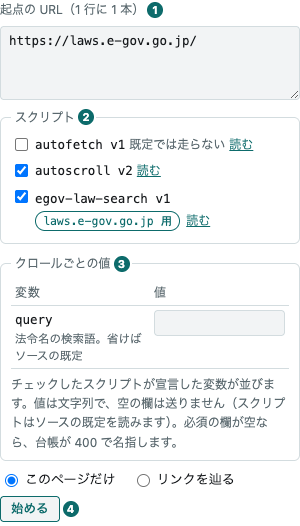
① seed URLs
② スクリプト (scripts): the checkboxes and 読む (read)
③ クロールごとの値 (per-crawl values): the fields for the variables the ticked scripts declare
④ 始める (start)
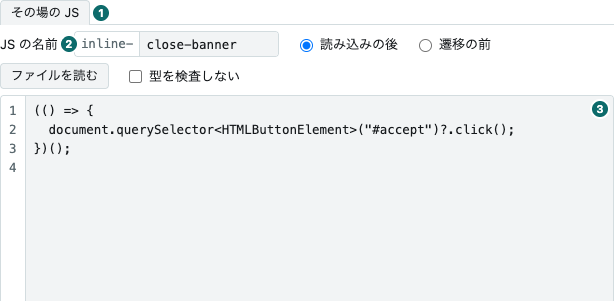
① the right column’s tabs
② JS の名前 (name of the script)
③ the script box
- It sends the seed URLs, whether the depth is 0, what runs — only when it differs from the
default — and the per-crawl variables, only those with a value. このページだけ sends
maxDepth: 0; リンクを辿る sends the rules, and the depth and the page limit only when they are written (empty, they are the ledger’s defaults). With the default set the seeds decide (of the scripts in the default, those without sites and the site scripts for a seed’s host) ticked and no script of your own, the form sends noscripts, and the ledger picks the same set from the seeds. A ledger with no scripts is still a 400, and so, with its own message, is one in which no script fits the seeds. Otherwise it sendsscripts: your script first, then the ticked registered scripts in the ledger’s order; unticking all of them sends[], which runs nothing. The dashboard checks neither the URLs nor the script’s name; the ledger says what is wrong with a 400, naming the ids it refused. - A site script can be ticked only when a seed is on its site. A script with sites can be
ticked only while one of the seeds is on one of those hosts. The seed’s hostname must match
exactly and its port is ignored (
laws.e-gov.go.jpandwww.e-gov.go.jpare different hosts). Writing a seed ticks the site scripts that fit it; the others cannot be ticked and say why, as in 起点に laws.e-gov.go.jp がありません (no seed on laws.e-gov.go.jp). With no seed yet, they say 起点を書くと選べます (write a seed to choose). A box you unticked stays unticked when the seeds change. The rule is the ledger’s: naming a site script that fits no seed gets a 400 from it. The example isegov-law-searchfrom capture-scripts (siteslaws.e-gov.go.jp), which searches law titles within e-Gov Law Search for the word in the variablequery(「セキュリティ」 when none is given); seedhttps://laws.e-gov.go.jp/to choose it, as in the picture above. - When a ticked script declares values, the クロールごとの値 (per-crawl values) box appears. A
script declares the names it reads in
paramsin thecatalog.jsonof capture-scripts; the ledger keeps them with each version andGET /api/scriptscarries them (from v0.67.0). A variable (kind: variable) becomes one row with its name, its description and a field for the value:queryin the picture above is declared byegov-law-searchas the search word, and the script reads it as__bh.vars.query. A required declaration is marked 必須 (required). Only the fields with a value are sent, asvariables; an empty field is not sent and the script falls back to the default in its source. The values are remembered: after a 202, and when unticking a script removes its rows, they stay, and come back when the script is ticked again. The dashboard does not check them: the spelling of a name (a lowercase letter, then lowercase letters, digits and_, up to 64 characters), at most 32 per crawl and values up to 4,096 characters are the ledger’s rules, and when a required field is empty or a name no script declared is sent, the ledger answers 400 naming it (under the left column you read something like400 —— missing variables: query). A secret (kind: secret) is listed under 使うシークレット (secrets used) by name only, with no field: its value is put by a person into the Windmill variablef/waggle_secrets/<name>, the ledger checks that it exists (otherwise a 400 naming it with its path), and Windmill resolves it for the script on every crawl. The value never reaches the dashboard, the ledger or the WACZ. No bundled script declares a secret, so this view passes variables only; the declaration of a script of your own (inline.params) can be added only when calling the ledger’s API directly. - A script left out of the default is listed unticked. It reads 既定では走らない (does not run
by default) beside its name, as autofetch does in the picture above: a script whose entry in the
catalog.jsonof capture-scripts says"default": false, every version of which the ledger keeps disabled. A crawl that names no scripts does not run it. Tick it and the form names it, and the ledger runs its newest version. A box you ticked is remembered like one you unticked, and a fetch does not reset it. - It shows the size before sending. Under the box are the number of lines, the size of the body
it will send (UTF-8 bytes) and how much of the limit that is. The limit is the one the writing
route enforces, handed out by the server as
writeLimitin/healthz. Over it, the line turns red and 始める cannot be pressed. - The name of your script becomes its id. Write it in the box labelled JS の名前 (name of the
script) in the right column. The
inline-in front stays:close-bannergives the idinline-close-banner. Start with a lowercase letter, then use only lowercase letters, digits and-, up to 57 characters (the ledger’s rule). This view does not check it: a wrong or empty name is refused by the ledger with a 400, and under the left column you read something likebody/scripts/0/inline/name must match pattern "^[a-z][a-z0-9-]*$". The name is sent only when the box holds a script; with an empty box it is not used. The id appears in a crawl’s list of what ran and in the archive’sbehaviors/custom.jsonl, and it is the key your script reports under (__bh.report("inline-close-banner", …)). 欄に戻す (back to the form) fetches your script back by this name. - A script of your own is type-checked as strict TypeScript at the first level’s compile step,
and a single error fails the crawl; open its row to read the number of diagnostics and the first
five. Wrap it in an IIFE, give the elements you look up a type, and use
?.. Do not writeexport: the page then gets a syntax error and nothing runs. - For a bundled script, tick 型を検査しない (skip the type check). Ticking it puts
// @ts-nocheckon the first line of the box, and unticking takes it off: what you see is what is sent, and the ledger’s sha256 covers it too. A pasted script that already starts with that line shows the box ticked. - The box does not wrap lines, so the line numbers stay in step; long lines scroll sideways.
読み込みの後 (after load) runs once in the main frame; 遷移の前 (before navigation) runs in every
frame on every navigation and has no
__bh. ファイルを読む (read a file) loads a file into the box, in the browser only; if the name box is empty, it takes the file name without its extension. Fix it before starting if it breaks the rule above (capital letters or_). - A registered script can be read in the right column. Press 読む (read) next to its checkbox:
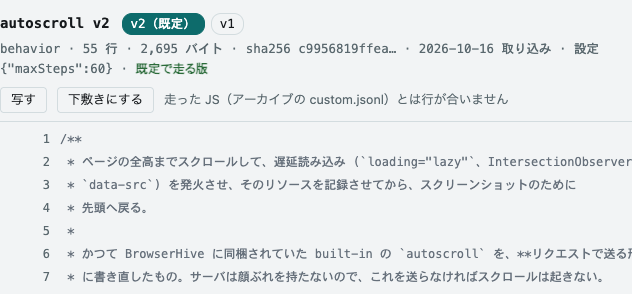
a second tab opens in the right column, named like
autoscroll v2, with the source of that version in colour. The view does not change. The box is only hidden: your script, its scroll position and the cursor stay, and the その場の JS (your script) tab brings it back. You can tick and untick while reading, and read a site script whose checkbox is disabled. One script is open at a time; another 読む replaces it, and × closes it. The window has 写す (copy), 下敷きにする (use as a template) and a link that opens the script in the scripts view, which alone has the version chips and line URLs. With ⌘ or Ctrl held, the browser opens the scripts view in another tab instead.
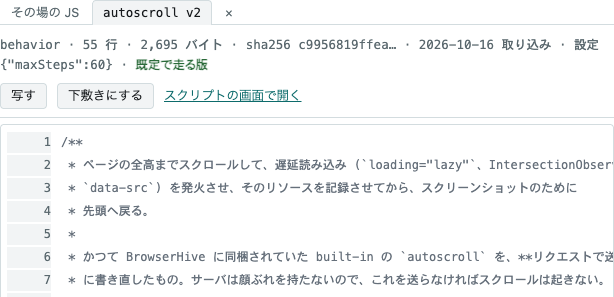
- リンクを辿る opens the 辿り方 (how to follow) tab. It holds the depth and the page limit, the
presets, and the rules. A rule is an action — 撮って辿る (capture and follow), 撮るだけ (capture
only) or 落とす (drop) — and what it matches:
same-origin,same-host,same-siteorany(compared with the seeds), a lower-case host name (that host and the subdomains under it), or anhttp(s)URL (a prefix). The ledger tries the rules from the top, the first match decides, and a link no rule matches is dropped. The tab starts with ホストの中 (within the host); the presets サイトの中 (within the site), サイトの中+外は 1 歩 (within the site, one step outside), ホストの中 and どこでも (anywhere) each hold a 撮って辿る rule, because the ledger refuses seeds that do not land on one. + 落とす行を足す adds a drop rule at the top — below a broad 撮って辿る rule it could never match. The ↑ ↓ × buttons name their row for screen readers, and focus follows the row that moved.
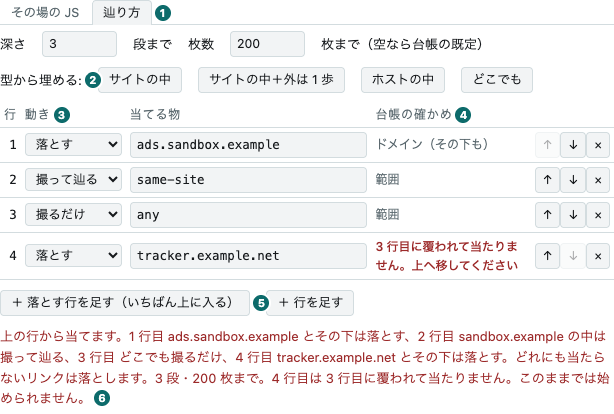
① 辿り方 (how to follow)
② the presets
③ the action of each rule
④ the ledger’s check of each rule
⑤ adding a drop rule at the top
⑥ what the crawl will do, restated
- The ledger checks the rules as you write them. After a 300 ms pause the view asks the ledger’s
GET /api/crawl-rules/check(it writes nothing, so it rides the same pass-through as the lists). Each row then says what the ledger read — 範囲 (scope), ドメイン (domain) or 前方一致 (prefix) — or, in red, that it cannot be read or that an earlier row covers it; the sentence under the table restates what will be followed, in the ledger’s reading (a URL prefix appears normalised). While the ledger says the rules cannot start, 始める cannot be pressed. When the ledger cannot be asked, nothing is blocked: starting gets its answer instead. - A 202 or a 409 takes you to the crawls view. When the crawl is accepted, its row gets a mark; if a crawl is already running, the row in the way gets the mark (the ledger runs one crawl at a time, overall). An accepted crawl is running, so the footer starts polling every 2 seconds. Anything else (a 400, a 413, an unreachable server) stays in this view, in the ledger’s own words under the left column.
- After a 202 the seed URLs are cleared; your script and the values of the variables are kept, since the usual next step is to fix it and run again.
- 欄に戻す (back to the form) brings you back here. Open a row in the crawls view and press
欄に戻す on a script of your own: this view opens with its name, phase and source. The source
comes from the ledger’s
/api/crawls/:id/inline/:name(a crawl’s detail only carries its size). The seed URLs and the ticked scripts are left alone. If the right column was showing a registered script, it switches back to the その場の JS tab. - 下敷きにする (use as a template) in the scripts view brings a registered script
here as a script of your own, named
my-<id>unless the name box already has one. Only the two forms that name the script’s own id,__bh.opts["<id>"]and__bh.report("<id>", are changed toinline-<name>; the message under the left column says on which lines. The original is unticked, so it does not run twice. If the box already holds a script, the scripts view asks before replacing it. 下敷きにする in the right column’s reading window does the same, and asks inside that window; afterwards the その場の JS tab is in front, and the reading window stays open for comparing. A site script’s sites do not come along: a script of your own runs from any seed, and the check at the top of the script (comparinglocation.hostname) keeps it idle on other sites. - The types of
__bhare one link away. The note under the left column links to them (#scripts/types/host.d.ts); a plain click opens them in the right column’s reading window. - The row gets a mark, and is not opened. The mark is remembered by id and put back each time the table is redrawn.
It is sent through POST /api/crawls in Routes.
Archives
Section titled “Archives”The WACZ files you can see, newest capture first.
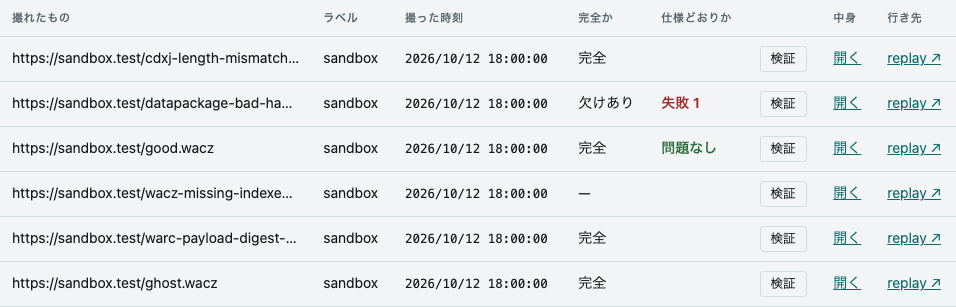
- A
—under 完全か (complete?) means “unknown”. The ledger’swaczCompleteis null for that row, which is not the same as 欠けあり (incomplete). - 検証 (validate) only runs when you press it. Opening the list does not run it. The result also stays in the row’s 仕様どおりか (conforms?) cell, so after looking at several archives you can tell how each one did without pressing again. What the report shows is in Inspecting a WACZ.
- 開く (open) enters the contents view (
#wacz/<archiveId>). - “replay ↗” opens it in replay. The link is built from the replay origin the server hands
out through
/healthzand theobjectKeythe ledger returns.
Scripts
Section titled “Scripts”The scripts that run inside the pages being captured, to read before writing one of your own, or
to see exactly what a crawl ran. On the left is a list in four groups: the scripts that run by
default (the newest enabled version of each id without sites, which is what a crawl runs when it
names none), the site scripts (those with sites, which run only when a seed is on their site), the
scripts that do not run by default (under 既定では走らない, those with no enabled version, whose
newest version runs when a crawl names them), and, under 書くための型 (types to write against),
host.d.ts, the types of __bh, the object the capture server puts in the page for scripts to
use. All but host.d.ts also appear as checkboxes under スクリプト (scripts) in the
new crawl view (those that do not run by default unticked), where 読む (read)
next to one opens it in the right column.
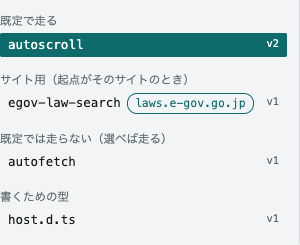
On the right is the TypeScript as it was written, with line numbers.
| URL | Opens |
|---|---|
#scripts |
the first script in the list (the URL changes to name it) |
#scripts/autoscroll |
the version that runs by default (for a script that does not, the newest) |
#scripts/autoscroll@1 |
version 1, enabled or not |
#scripts/autoscroll@1:33 |
version 1, with line 33 marked and scrolled into the middle |
#scripts/types/host.d.ts |
the types of __bh |
- The heading says which version you are reading. Chips list every version of the id, the
default one marked 既定 and disabled ones 無効. Under them are the line count, the size, the start of the sha256, the day
it was imported, the options it is given (
{}means the defaults written in the code), and whether it is the version that runs by default. A site script has its sites beside its name, and its default version reads 起点に laws.e-gov.go.jp があれば既定で走る版 (runs by default when a seed is on laws.e-gov.go.jp). A disabled version reads 無効(既定では走らない) (disabled; does not run by default). - Sites mark a script that only makes sense on certain sites. The sites (
sites) are a list of hostnames, written in thecatalog.jsonof capture-scripts and kept by the ledger with each version. A site script runs by default only when one of the crawl’s seeds is on one of those hosts. The rule holds for the whole crawl, so the script also runs on pages of other hosts the crawl reaches by following links; the script checks the hostname first and does nothing elsewhere. - Click a line to put it in the URL, to send someone straight to it. This adds nothing to the browser history and does not redraw the view.
- 写す (copy) puts the source on the clipboard. 下敷きにする (use as a template) takes it to the new crawl view as a script of your own.
- The source is colored. The colors come from Shiki with the same TypeScript grammar as VS Code, in GitHub Light High Contrast or GitHub Dark Default to follow the screen’s light or dark scheme (the pair whose colors all stay readable on the screen’s backgrounds). The lines appear in one color first and the colors follow a moment later: the coloring runs off the page’s main thread (in a worker), so even a long file can be read and scrolled at once. The marked line stays one color. If the colors cannot be loaded, a line above the source says so, and the source stays readable in one color.
- The lines are the TypeScript’s. A crawl runs the compiled JavaScript, which is what the archive
keeps in
behaviors/custom.jsonl, and its lines are a few off from these in places. - 読む (read) in a crawl’s detail opens the version that crawl ran, and carries the start of its sha256 as well. Version numbers can be reused (removing the newest version and adding one again gives the number to different bytes), so when the bytes differ, the view says so above the source.
- Only what you open is fetched. The list comes with the regular fetch and is redrawn only when
it changes. The versions and the source of a script are fetched when you open it, and the types
of
__bhonce, when you first open the view. The routes are capture-ledger’sGET /api/scripts/:id/versions,GET /api/scripts/:id/versions/:versionandGET /api/host-types(from v0.60.0; the sites from v0.61.0; the list,GET /api/scripts, carries the scripts that do not run by default, withenabled: false, from v0.64.0), passed through as in Routes.
A ledger with no scripts is shown in red. The capture server (BrowserHive) does not bring any scripts of its own, so with no scripts in the ledger nothing runs inside the page. Nothing scrolls and nothing lazy-loads, yet the capture still succeeds and an archive still comes out. The red message includes the command that imports the scripts with capture-ledger (the ledger that starts crawls and records what came back).
Polling
Section titled “Polling”While at least one crawl is running, the lists are fetched every 2 seconds; otherwise every 30 seconds. Without keeping a copy, the dashboard still looks live while something runs, and stays quiet when nothing does.
When a fetch fails, the dashboard keeps the last tables it could draw and shows the reason at the top (see “Fix it from the message” in the Quickstart).